Pedestrian & Cyclist Path System
Overview
This system controls the movement of pedestrians and cyclists along defined paths in the scene. It is built from four cooperating components:
| Component | Role |
|---|---|
WaypointSystem |
Defines an ordered sequence of path points |
WaypointFollower |
Moves a character along a WaypointSystem |
HumanNpcSpawner |
Pool-based spawner that assigns NPCs to unique paths |
SpawnerOnWaypoint |
Manual or timed spawner for individual scenario NPCs |
ScenarioHumanId |
Assigns a unique persistent ID to each spawned human |
WaypointSystem
This component should be added to a parent GameObject. Child Transform objects define the waypoint positions in sequence.
Setup
- Create a parent GameObject (e.g.,
Path_Sidewalk_A). - Add child
Transformobjects at each waypoint position. - Add the
WaypointSystemcomponent to the parent. - Click Clear Waypoints, then Generate Waypoints from Children — this populates the list in order.
If Gizmos are enabled, the path is drawn as:
- Cyan spheres at each waypoint
- Green lines connecting consecutive waypoints
- A closing line from last to first when loopStatus = true
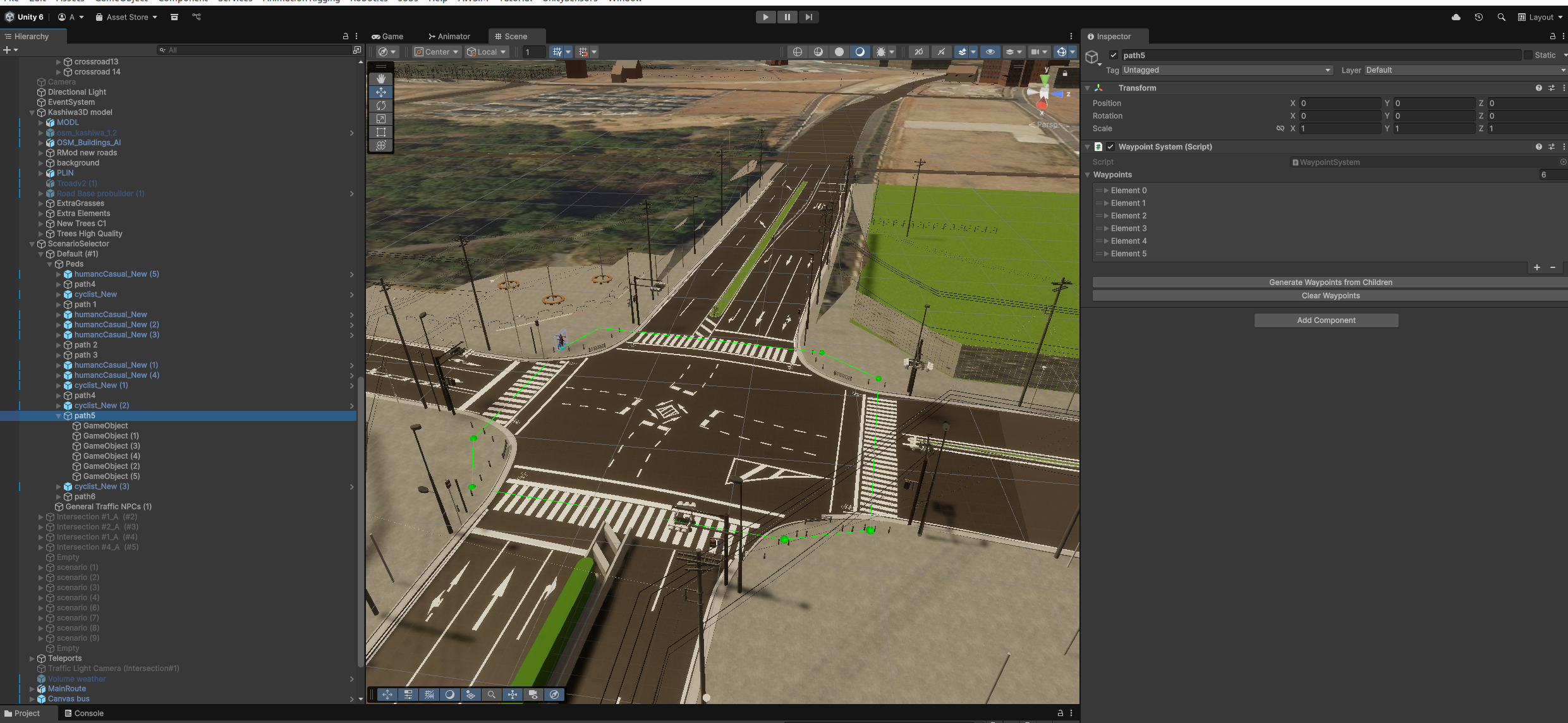
Green line in the Scene view and WaypointSystem in the Inspector.
Key Properties and Methods
| Member | Description |
|---|---|
loopStatus |
When true, GetNextWaypointIndex() wraps from last back to first |
GetFirstWaypoint() |
Returns the first waypoint Transform |
GetClosestWaypoint(position) |
Finds the nearest WaypointNode to a world position |
GetClosestWaypointIndex(position) |
Returns the index of the nearest waypoint |
GetNextWaypointIndex(index) |
Returns (index + 1) % count |
GetWaypointByIndex(index) |
Direct index access |
GenerateWaypointsFromChildren() |
Auto-populates the list from child transforms |
EndPathCheck(index) |
Returns true when index == count - 1 |
WaypointFollower
By adding a WaypointFollower component to a pedestrian or cyclist, it will automatically navigate toward successive waypoints in the assigned WaypointSystem.
Assign the target path via the waypoint field in the Inspector.
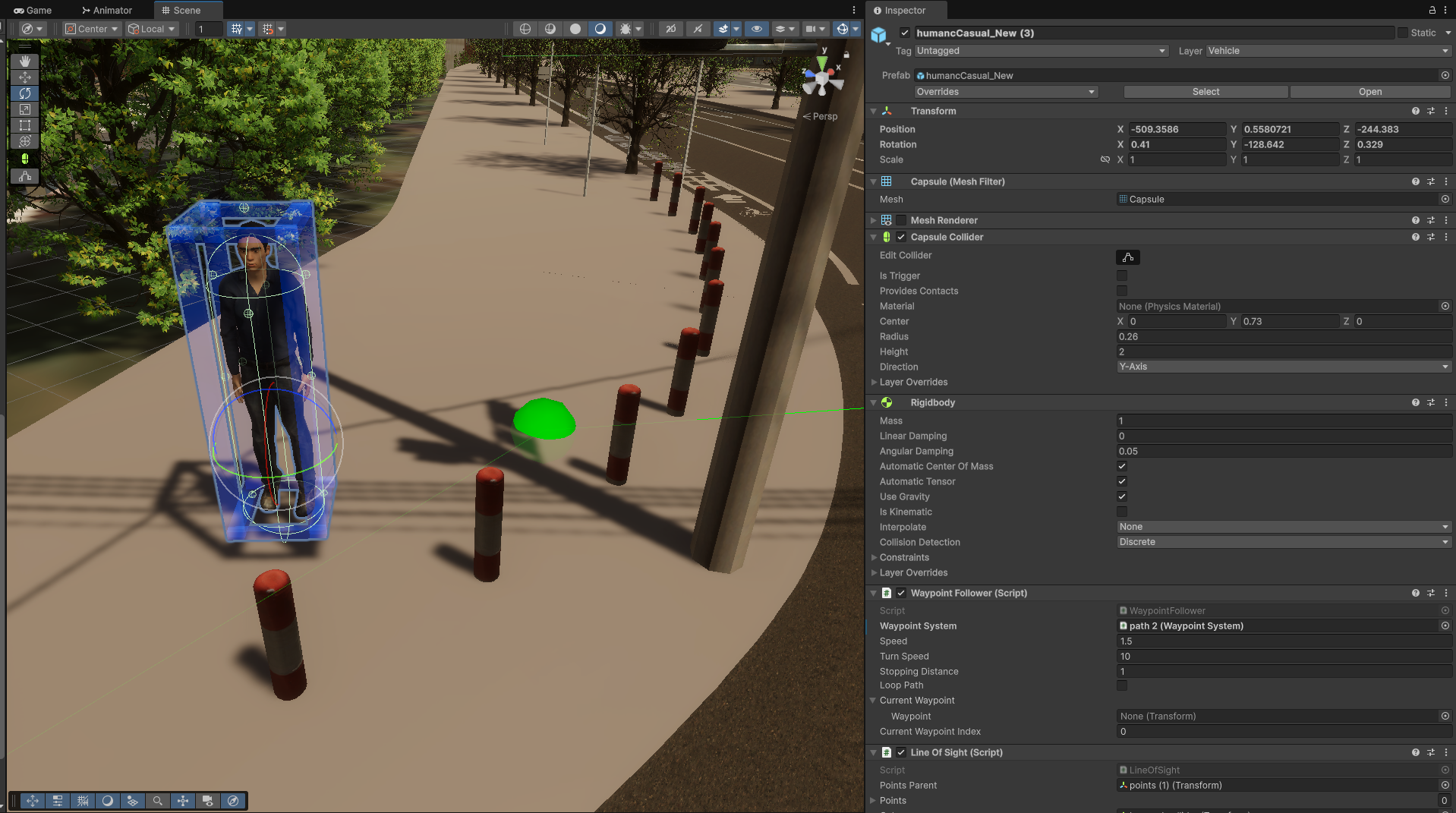
Pedestrian NPC with a WaypointFollower component assigned.
IConstraintWayPoint
IConstraintWayPoint is an interface for adding stopping conditions at specific waypoints — for example, stopping at a red light before crossing the road.
Constraint components are evaluated when the follower reaches the waypoint they are attached to, so place traffic-light constraints just before the crossing point.
Provided implementations:
| Class | Description |
|---|---|
ConstraintPedestrianTrafficLight |
Stop when pedestrian signal is red |
ConstraintCarTrafficLight |
Stop when vehicle signal is red |
ConstraintSaftyDistance |
Stop when a vehicle is too close |

Traffic light constraint attached to a waypoint before the crossing.
HumanNpcSpawner
HumanNpcSpawner manages a pool of human NPCs and spawns them continuously throughout a simulation run. It is designed for crowd scenes where many pedestrians need to be maintained without manual placement.
Spawn Behaviour
- On start, an initial burst of NPCs is spawned immediately.
- A repeating coroutine spawns additional NPCs at random intervals within a configured range.
- Before instantiating a new NPC, the spawner reuses any deactivated NPCs from the pool.
- Each NPC is assigned to a unique
WaypointSystem— two active NPCs never share the same path.
Fields
| Field | Description |
|---|---|
npcPrefab |
Human NPC prefab to instantiate |
waypointSystems |
All available WaypointSystem paths |
spawnCountVariance |
Random variance applied to the spawn count per batch |
spawnInterval |
Time between spawn batches |
Pool Reuse
When an NPC reaches the end of its path and deactivates, it is returned to the pool and becomes available for reassignment on the next spawn cycle.
SpawnerOnWaypoint
SpawnerOnWaypoint is a lighter-weight spawner for scenario-specific pedestrian placements. It spawns a single NPC either on a key press or on a configurable timer, and assigns it to a specific WaypointSystem.
Fields
| Field | Default | Description |
|---|---|---|
spawnKey |
KeyCode.O |
Manual spawn key |
useRandomTimer |
false | Enable automatic timed spawning |
minTime / maxTime |
— | Random interval range for timed spawning |
waypointSystem |
— | Path the spawned NPC will follow |
npcPrefab |
— | NPC prefab to instantiate |
Every NPC spawned by SpawnerOnWaypoint receives a unique ScenarioHumanId automatically.
Tip
Use SpawnerOnWaypoint when you need to trigger a pedestrian appearance at a specific scenario moment. Use HumanNpcSpawner when you want continuous background crowd generation.
ScenarioHumanId
ScenarioHumanId assigns a globally unique sequential integer ID (as a string) to each human NPC. It is added automatically by both HumanNpcSpawner and SpawnerOnWaypoint.
Purpose
The ID is used by the LogArea system to uniquely identify each pedestrian across CSV rows, even if multiple pedestrians are in the scene at the same time.
Usage
var idComp = npc.GetComponent<ScenarioHumanId>();
idComp.AssignNewId();       // assigns the next available ID
string id = idComp.HumanId; // "0", "1", "2", ...
IDs are sequential and restart from 0 each time Unity enters Play mode. The DisallowMultipleComponent attribute ensures only one ID is assigned per NPC.