Teleporter Component
Overview
The Teleporter component is a trigger-based system that automatically relocates the ego (autonomous) vehicle to a new spawn position whenever it exits through a designated trigger volume. It handles NPC clearance at the destination, optional delays, and logs the spawn selection data for analysis.
No hotkeys
The Teleporter gate is triggered only by the ego vehicle entering its collider; it has no keyboard shortcuts. The Q/E/F/X keys described in the QuickStart belong to a different feature (ScenarioSelector start points).
Key Design Goal
The Teleporter is designed for repeatable, controlled experiments: by targeting a midpoint lane segment with a randomized arrival time, each run places the ego vehicle at a different distance from a point of interest while keeping the scenario statistically comparable.
Spawn Strategies
The Teleporter supports two independent strategies, selectable from the Inspector.
Samples candidate spawn positions along a set of configured TrafficLane objects, then picks the candidate whose estimated travel time to a target midpoint lane is closest to a randomly drawn target time.
This strategy guarantees that the ego vehicle is placed at a realistic driving distance from the point of interest — far enough to observe natural traffic behaviour before reaching it.
Picks a random Transform from a hand-placed list of RandomSpawnPoint entries. Only valid entries (non-null entry with an assigned point) are considered. Each entry can optionally override the rotation with a custom Euler angle.
Use this strategy when you need full manual control over spawn positions without any ETA logic.
LaneMidpoint Strategy in Detail
Candidate Generation
The Teleporter walks through all LaneSpawnSource entries and samples each lane at regular intervals defined by spawnSubdivisionSpacing (default 10 m):
Lane waypoints → cumulative distance table → sample every N metres
If includeSegmentEndpoints is enabled, sampling starts at the lane start (0 m) and the lane end (lane length) is always added as a candidate, even when the length is not a multiple of the spacing. If it is disabled, sampling starts at spawnSubdivisionSpacing and the lane end is only included when it falls on a sample. The spacing is clamped to at least 1 m.
For each sample, the component caches:
- World position (interpolated along the lane waypoints)
- Forward direction (used to orient the vehicle on spawn)
Distance Calculation (Dijkstra)
For each candidate, the Teleporter computes the driving distance to the configured midpointSegment lane. When the candidate is on a different lane than the midpoint, it runs a lightweight Dijkstra search through the lane graph (NextLanes connections):
cost(start_lane) = lane_length - distance_from_start
cost(next_lane)  = cost(current_lane) + next_lane_length
...
stop when midpointSegment is reached
Candidates with no reachable path to the midpoint are excluded, as are candidates on the midpoint lane itself that lie past the target point.
ETA Calculation
Travel time is estimated with a two-phase kinematic model (acceleration + cruise):
Where:
- \(d\) = distance to midpoint (metres)
- \(v_c\) = cruise speed (
cruiseSpeedKmhconverted to m/s) - \(a\) = assumed acceleration (
assumedAcceleration)
Target Time Selection
Each teleport draws a random target arrival time uniformly from targetArrivalWindow:
t_target ~ Uniform(targetArrivalWindow.x, targetArrivalWindow.y)
The candidate with the smallest |ETA - t_target| is selected.
Teleport Sequence and NPC Clearance
When a Vehicle enters the trigger, the Teleporter runs one coroutine per vehicle in this order:
- Pick the destination with the selected spawn strategy. If no candidate is found (empty
laneSpawnSources, missing or unreachablemidpointSegment, or no valid random points), it logs the warningTeleporter: No spawn candidate available. Aborting teleport.and does nothing. - Optional random delay drawn from
spawnDelayRange(only ifspawnDelayRange.y > 0). The ego vehicle keeps driving during this delay. - Clear NPCs: calls
RemoveVehiclesInRadius(destination, clearanceRadius)on everyTrafficManagerfound in the scene atAwake. Clearing happens after the random delay, right before the teleport, so NPCs have little time to drive back into the cleared area. - Wait
teleportDelayseconds so the marked NPCs are despawned (see NPC Cars). - Move the ego: sets the Rigidbody kinematic and sets the pose over several
FixedUpdatesteps. - Log the selection via
LogAutonomous.LogSpawnSelection()(if the vehicle has that component). - Restore physics: Rigidbody non-kinematic, position/rotation set, linear and angular velocity zeroed. After two more
FixedUpdatesteps the vehicle can trigger the gate again.
sequenceDiagram
    participant T as Trigger Volume
    participant TP as Teleporter
    participant TM as TrafficManager
    participant EGO as Ego Vehicle

    T->>TP: OnTriggerEnter (ego vehicle)
    TP->>TP: SelectSpawnCandidate() (abort if none)
    TP->>TP: Wait random delay (spawnDelayRange, optional)
    TP->>TM: RemoveVehiclesInRadius(dest, clearanceRadius)
    TP->>TP: Wait teleportDelay
    TP->>EGO: Rigidbody kinematic = true
    TP->>EGO: SetPositionAndRotation(dest) over FixedUpdates
    TP->>TP: LogSpawnSelection()
    TP->>EGO: kinematic = false, zero velocities
Disabling the gate
If the Teleporter is disabled while a teleport is in progress, OnDisable makes the affected vehicles' Rigidbodies non-kinematic again and clears the in-progress set, so new teleports are allowed once it is re-enabled.
Inspector Reference
Teleport Timing
| Field | Default | Description |
|---|---|---|
clearanceRadius |
10 m | Radius around destination to clear NPC vehicles |
teleportDelay |
0.5 s | Fixed wait after NPC clearance, before teleport |
spawnDelayRange |
(0, 0) |
Random delay before NPC clearance: X = min, Y = max. Set Y > 0 to enable. The ego keeps driving during this delay. |
Strategy Selection
| Field | Default | Description |
|---|---|---|
spawnStrategy |
LaneMidpoint |
LaneMidpoint or RandomPoint |
Lane-Based (Midpoint Targeting)
| Field | Default | Description |
|---|---|---|
laneSpawnSources |
— | Lanes to sample candidates from |
spawnSubdivisionSpacing |
10 m | Distance between sampled points along each lane |
includeSegmentEndpoints |
true | Include lane start and end as candidates |
midpointSegment |
— | The target lane for ETA calculation |
midpointSegmentFraction |
0.5 | Normalised position on midpoint lane (0 = start, 1 = end) |
cruiseSpeedKmh |
30 km/h | Cruise speed for ETA estimation |
assumedAcceleration |
2 m/s² | Acceleration for ETA estimation |
targetArrivalWindow |
(0, 90) s |
Random range for target arrival time |
Random Spawn Points
| Field | Description |
|---|---|
randomSpawnPoints |
List of entries used by the RandomPoint strategy, each with a point (Transform) |
useCustomRotation |
Per-entry toggle to override rotation with customEulerRotation |
customEulerRotation |
Euler angles (degrees) used when useCustomRotation is enabled |
Custom rotation of (0, 0, 0)
A customEulerRotation of exactly (0, 0, 0) is treated as "not set": the point's own rotation is used even if useCustomRotation is enabled. To face world +Z, use a tiny non-zero value (e.g. (0, 0.01, 0)) or rotate the point's Transform instead.
Spawn Selection Logging
After every teleport, the Teleporter calls LogSpawnSelection() on the ego vehicle's LogAutonomous component (if present). This writes one row to the spawn selection CSV:
| Column | Description |
|---|---|
midpoint_segment |
Name of the target midpoint lane (None if not assigned) |
spawn_lane |
Name of the selected spawn lane (or RandomPoint) |
sample_index |
Index of the sample point on the spawn lane (for RandomPoint: index in randomSpawnPoints) |
distance_to_midpoint_m |
Dijkstra path distance to midpoint (m) |
estimated_time_s |
Kinematic ETA to midpoint (s) |
target_time_s |
Randomly drawn target arrival time (s) |
reached_cruise |
1 if cruise speed is reached before the midpoint, else 0 |
target_x, target_y, target_z |
Teleport destination in ROS map coordinates (MGRS local), the same frame as the ego log |
ros_time_sec, ros_time_nsec |
ROS time of the teleport |
For the RandomPoint strategy, distance_to_midpoint_m, estimated_time_s and target_time_s are 0 and reached_cruise is 0.
The file is named <logFilePrefix>_<name>_yyyyMMdd_HHmmss.csv, where <name> comes from spawnSelectionLogPath (default AutonomousSpawnValidation.csv) and logFilePrefix defaults to Auto. The file is created in the directory of spawnSelectionLogPath, which is created automatically if missing.
See Loggers for details on the full CSV output.
Scene Setup
Step 1 — Create the Trigger Volume
- Create an empty GameObject.
- Add a BoxCollider and enable Is Trigger.
- Scale it to cover the exit area of your road loop.
- Attach the Teleporter script.
Step 2 — Configure Lanes (LaneMidpoint strategy)
- In the Inspector, add entries to Lane Spawn Sources and assign
TrafficLaneobjects that cover the valid spawn zone. - Assign the Midpoint Segment — the lane the ego vehicle should be heading toward on each run.
- Adjust
cruiseSpeedKmhandassumedAccelerationto match the ego vehicle's expected behaviour.
Step 3 — Tune the Arrival Window
Set targetArrivalWindow to the range of arrival times you want to study. For example:
(10, 60)s → the selected spawn has an estimated arrival time close to a random value between 10 and 60 s (limited by the available candidates)(0, 0)→ vehicle always spawns as close to the midpoint as possible
To see which arrival times your lanes can actually produce, add the TeleporterDebug component to any GameObject and assign the Teleporter (if left empty, it uses the first Teleporter found). When the component is enabled it logs to the Console each source lane's length, the total length, and the range of ETAs from the closest to the farthest spawn sample to the midpoint target. Choose a targetArrivalWindow inside that range. TeleporterDebug is editor-only; it does nothing in player builds.
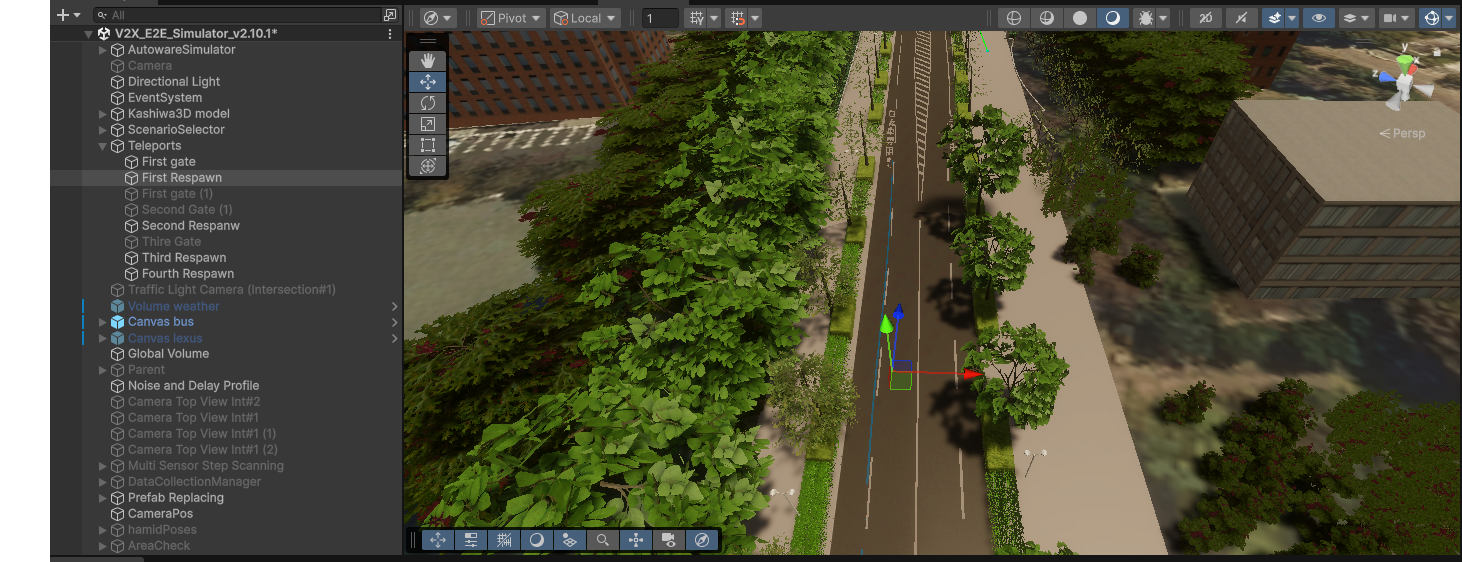
Figure 1: Final vehicle position after teleport
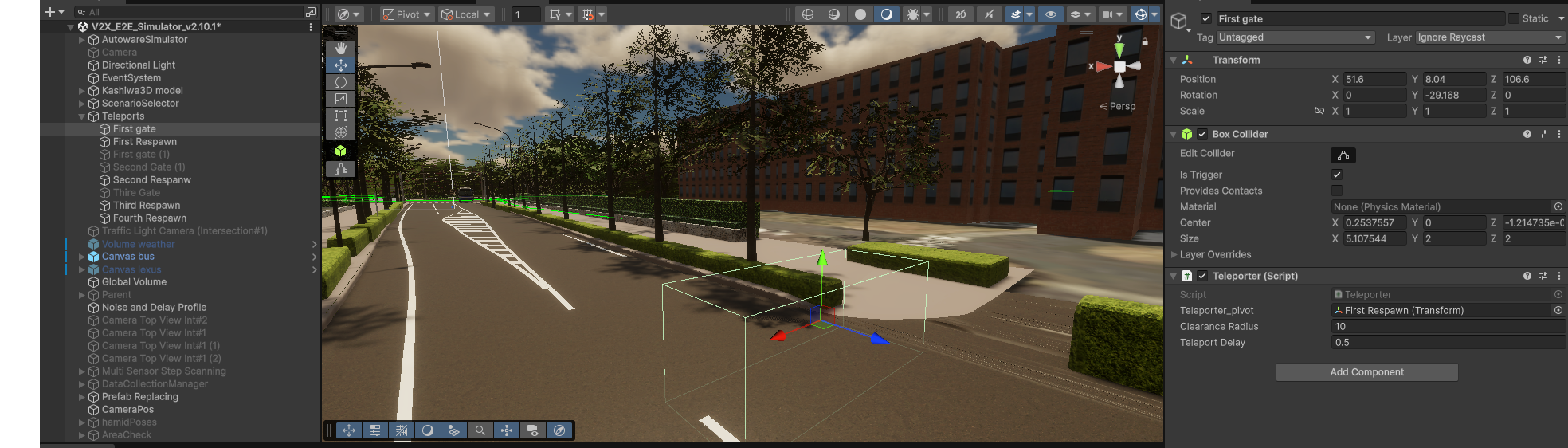
Figure 2: Trigger gate and BoxCollider in the scene
Tips and Best Practices
Lane Coverage
Add lanes that span the full approach zone to the midpoint. More candidates give the system more flexibility to match the target arrival time precisely.
Clearance Radius
Set clearanceRadius large enough to prevent the ego vehicle from spawning inside an NPC. A value of 10–15 m is usually sufficient.
Midpoint Must Be Reachable
If no candidate has a connected path (via NextLanes) to the midpointSegment, the teleport is aborted with the warning No spawn candidate available. Aborting teleport. and the ego keeps driving. TeleporterDebug reports Could not compute distance to midpoint in this case.
Re-trigger Prevention
The Teleporter internally tracks which vehicles are currently being teleported (teleportingVehicles HashSet), so a vehicle re-entering the trigger during the delay phase is ignored.