Vehicle Despawn System
Overview
The Vehicle Despawn System removes NPC vehicles within a specified radius. It is used before moving the ego vehicle (Bus or Lexus) to a new position, to prevent collisions with NPCs at the destination. In-code callers are the Teleporter gate and ScenarioSelector (Q/E/F/X start points); TestTrafficRemovingNpc is a manual test component.
How It Works
The system uses a two-phase approach:
- Mark Phase: Vehicles within radius are flagged for removal
- Despawn Phase: Flagged vehicles are destroyed in the next
FixedUpdate()
System Flow
Game Code (Teleporter, ScenarioSelector, TestTrafficRemovingNpc)
    ↓
TrafficManager.RemoveVehiclesInRadius()
    ↓
NPCVehicleSimulator.RemoveVehiclesInRadius()
    ↓
NPCVehicleInternalState (ShouldDespawn = true)
    ↓
TrafficManager.FixedUpdate() → Despawn()
Usage
Basic Implementation
using AWSIM.TrafficSimulation;
using UnityEngine;

public class TestTrafficRemovingNpc : MonoBehaviour
{
    [SerializeField] TrafficManager trafficManager;
    [SerializeField] Transform centerTransform;
    [SerializeField] float radius;
    [SerializeField] KeyCode RemoveKey = KeyCode.R;

    private void FixedUpdate()
    {
        if (Input.GetKeyDown(RemoveKey))
        {
            trafficManager.RemoveVehiclesInRadius(centerTransform, radius);
        }
    }
}
Component Setup
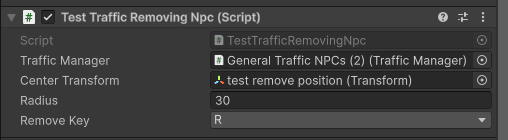
Inspector Parameters: - Traffic Manager: Reference to the TrafficManager in the scene - Center Transform: The center point for vehicle removal (e.g. the ego vehicle transform) - Radius: Distance in meters from center point - Remove Key: Keyboard key to trigger removal (default: R)
API Reference
RemoveVehiclesInRadius
Overloads:
- TrafficManager.RemoveVehiclesInRadius(Vector3 center, float radius)
- TrafficManager.RemoveVehiclesInRadius(Transform centerTransform, float radius) - uses centerTransform.position; logs a warning and returns 0 if the transform is null
Parameters:
- center / centerTransform - Center point of removal area
- radius (float) - Radius in meters
Returns: int - Number of vehicles marked for removal (vehicles already marked are not counted again). Returns 0 with a warning if the NPCVehicleSimulator is not initialized.
The call affects only the NPCs of the TrafficManager it is called on. If the scene has several TrafficManagers, call it on each (the Teleporter and ScenarioSelector do this).
Implementation Details
Distance Calculation
The system uses squared distance (sqrMagnitude) for performance:
var distanceSquared = (state.Position - centerPosition).sqrMagnitude;
if (distanceSquared <= radiusSquared)
{
    vehicleState.ShouldDespawn = true;
}
Despawn Timing
Vehicles are not destroyed immediately. Destruction occurs at the end of the next TrafficManager.FixedUpdate() (typically ~0.02 seconds later).
Testing
- Add
TestTrafficRemovingNpccomponent to any GameObject - Assign the TrafficManager reference from the scene
- Set the center transform (ego vehicle or target location)
- Configure the radius (recommended: 20-30m)
- Enter Play mode and press R key to test removal
Performance Notes
- Time Complexity: O(n) where n is the number of active vehicles
- Optimization: Uses squared distance to avoid expensive square root calculations
- Recommended Radius: 20-30m when clearing an area around a spawn point
Common Issues
Vehicles still visible after pressing the key
- Wait one FixedUpdate() cycle. Destruction is deferred, not immediate.
Nothing happens when pressing the key - Verify TrafficManager reference is assigned in Inspector - Check that vehicles exist within the specified radius - Ensure the key code matches your input
Performance drops when removing vehicles - Reduce the radius value - Avoid calling the function every frame
Notes
- The test component uses
FixedUpdate()withInput.GetKeyDown()for testing purposes - In production, call
RemoveVehiclesInRadius()before teleporting or spawning the ego vehicle - Vehicles marked for despawn remain in the scene until next physics update
Related: Traffic Spawning System, Teleporter